After reading the appropriate section in your prescribed textbook From Snapshots to Great Shots, please answer the following questions:
- Name all the functions / buttons on the front of your camera
- Name all the functions / buttons on the back of your camera
- Explain how you would set the correct ISO
- Explain how you would change the aperture
- Explain how you would change the shutter speed
The easiest way to understand where the different sections are is with a visual map, so here is an image of my camera that shows the functions.

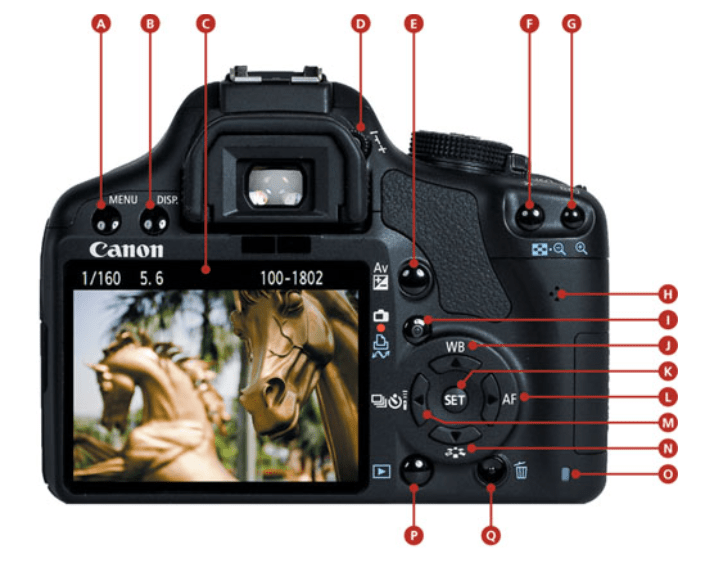
- A. Menu
- B. Display
- C. Rear LCD
- D. Dioptric Adjustment
- E. Aperture/ exposure compensation
- F. AE/AF Lock/ Focus/ Reduce Image
- G. Focus point selection / Enlarge Image
- H. Speaker
- I. Live View/ Moving Shooting
- J. White balance/ Up Cross Key
- K. Set
- L. Autofocus Selection/ Right Cross Key
- M. Drive Mode Selection/ Left Cross Key
- N. Picture Style/ Down Cross Key
- O. Card Busy
- P. Image Review
- Q. Trash
Correct ISO
The biggest reason to change the ISO setting is to adjust how fast the camera shoots images. The faster your camera ISO, the faster your shutter speed and your images will look sharp. When you get to shoot an image quicker with the ISO there is less chance of unwanted blur and freezing the image in an instant. The ISO setting determines how sensetive the camera sensor is to light. So the higher ISO setting, the more sensetive it is to light and takes the shot faster. Setting the ISO should be a mix between speed and photo quality. If you choose a ISO that is too high you will notice that the image is grainy in high resolution, therefor it’s important to weight up the available light and then set the lowest possible ISO setting that shoots quick enough to not make the image blurry.
Aperture
The aperture refers to the size of the opening in the lens of the camera. The size of the opening can be adjusted and the aperture size is measured in f-stops. This controls how much lights get through the camera lense. When you change the f-stop value, you change size of the opening. The higher the f-stops, the smaller the opening. If you use a wide aperture, the depht of field will be shallow. This means only part of the image is going to be sharp and the rest will be out of focus/blurred. Below you can see an illustration of the different f-stop values and how the lense works with it.

Shutter Speed
The shutter speed refers to the lenght of the time the opening of the lens remains open to let the light into the camera and the sensor. The shutter speed can be as fast as 1/10,000 of a second or as slow as several minutes. A faster shutting speed has the ability to freeze motion in the scene you are photographing. Slow shutter speeds will blur motion in the scene and both of these effects can be used creatively while photographing. Shutter speed can be a great use especially while shooting water in motion.
Sources
slrphotographyguide.com/how-to-choose-correct-iso-setting/
petapixel.com/2016/06/25/comprehensive-beginners-guide-aperture-shutter-speed-iso/
Book: From Snapshots to Great shots – Jeff Revell (Canon RebelT1i / 500D)
 My Reflective Journal